3ds Max Render Farm and Blender Render Farm Workflows in Architectural Visualization
22 June 2026
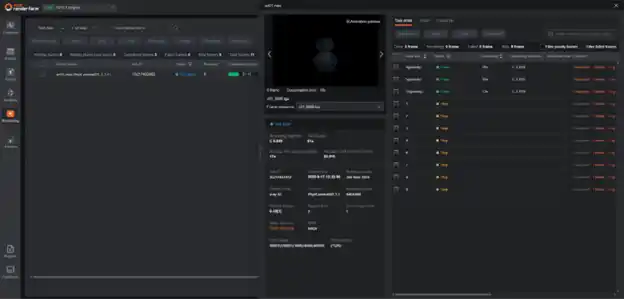
A 3ds Max or Blender render farm distributes heavy archviz renders across dozens of cloud nodes. Key success factors are the GI prepass strategy for V-Ray, correct asset packaging, and version-locked software. This guide covers both pipelines in full.
Why Archviz Burns Through Local Hardware Faster Than Any Other 3D Discipline
Archviz clients expect physically accurate light. That rules out baked lighting, real-time renderers, and approximate GI. Every deliverable needs full global illumination, displacement-mapped materials, and a correct environmental context.
In practice: dense vegetation with multi-scatter distribution and translucent leaf shades. Displacement geometry on stone, concrete, and brick that can’t fake depth at close range. IES photometric lights with physically correct photon emission. HDRI sky models tied to real GPS coordinates and time of day.
A moderately complex 4K exterior in V-Ray Next takes 45 to 90 minutes per frame on a high-end workstation. A 90-second animation at 24 fps is 2,160 frames—1,620 to 3,240 hours of solo render time. Nothing ships on that schedule.
What Lives Inside a 3ds Max Archviz Pipeline
3ds Max is the dominant DCC in commercial archviz. That position isn’t nostalgia; it’s the plugin ecosystem.
Forest Pack and RailClone from iToo Software handle vegetation scatter and parametric building facades. Anima by ArchVision populates scenes with animated pedestrians. Chaos Scatter manages ground cover distribution. None of these has a direct equivalent in other DCCs.
The render engine layer is split between V-Ray (Chaos Group) and Corona Renderer, with Chaos Group following the 2021 acquisition. Both handle GI, volumetrics, displacement, and IES lighting. But they serialize scenes differently, license differently on farm nodes, and fail differently when something goes wrong.
How V-Ray and Corona Differ on a Render Farm
V-Ray exports scenes to .vrscene, a serialized format that embeds geometry, materials, lights, and cameras. When you submit a V-Ray job, you’re submitting a .vrscene, not the .max source file. Every external reference inside that file must resolve on the remote node.
Corona renders natively from .max files with no separate export format. A Corona farm submission is the .max file plus every externally linked asset: bitmaps, HDRIs, IES files, and proxy geometry. Use Corona’s Asset Manager to audit the full dependency list before packaging.
The submission preparation workflow is different. The failure mode is different. Treat them accordingly.
Does V-Ray GPU Work for Production Farm Rendering?
Yes, and it’s faster for most archviz scenes. V-Ray GPU (formerly V-Ray RT GPU) handles physically based materials, IES lights, displacement, and volumetrics in full production mode—not preview mode.
The constraint is VRAM. A dense exterior scene with 4K textures across 30+ materials can exceed 24GB on a single high-end GPU. When it does, the V-Ray GPU falls back to CPU mode automatically and without warning. You lose the speed advantage while paying GPU node rates. Check VRAM usage before requesting GPU nodes.
What Kills a V-Ray Animation Job on the Farm
GI flicker. This is the failure that sends experienced artists back to the queue at midnight after a full render run.
V-Ray’s irradiance map GI solution calculates and caches lighting data. In single-frame mode, each frame is calculated independently. The cached data shifts slightly between frames. On screen, that reads as flickering or pulsing in shadowed areas and bounced light zones, and it’s unusable for delivery.
The correct approach depends on what’s moving in the scene:
- Camera-only animation: Use multi-frame incremental irradiance map mode. Pre-calculate across the full frame range. Save the irradiance map file. Render all frames from that fixed file.
- Objects in motion: Switch to brute force GI + light cache (single frame from file). Slower per frame, but no inter-frame GI inconsistency.
- Still images: The single-frame irradiance map is fine. No pre-pass management is needed.
Most first-time farm users submit animation jobs without defining a GI strategy. The farm returns 300 flickering frames. The farm executed correctly. The settings were wrong.
How to Handle V-Ray GI Prepass Files on a Farm
Pre-calculate the irradiance map before submitting the full render job. Save the output as a .vrmap file. Include that file in the submission package alongside the .vrscene. Set V-Ray’s GI mode to “From File” so every render node reads the same prepass data.
Skip this step on a V-Ray animation job, and you’ll get flicker. On Fox Renderfarm, the submission workflow includes a dedicated step for GI prepass file management. Use it.
How to Submit a 3ds Max Job to a Render Farm Correctly
Step 1: Lock software versions. Specify your exact 3ds Max version and render engine build number. A scene saved in Corona 11 will not open on a node running Corona 10. A version mismatch doesn’t produce an actionable error—the job just fails.
Step 2: Set output paths correctly. Use a relative path (.\Output\) or a UNC path that the farm node can access. Never submit with a local drive letter as the output destination. That path doesn’t exist on a remote machine.
Step 3: Define the GI strategy for any animation job. Document the choice before submission. Leaving it in default single-frame mode on a camera animation is how you produce 300 flickering frames overnight.
Step 4: Confirm Forest Pack and RailClone support. Fox Renderfarm maintains these libraries on render nodes. But confirm your specific library version is present. A library mismatch produces missing vegetation, which is easy to miss on a quick preview check.
Step 5: Run a 3-frame test before committing. Render frame 1, one frame from the middle of the sequence, and the last frame. Fifteen minutes of testing prevents overnight failures.
What Breaks Blender Farm Submissions
Missing external assets—same root cause as 3ds Max, slightly different mechanism.
Blender stores textures outside the .blend file by default. Submit the file without packing, and the farm renders missing material slots: grey surfaces where there should be stone and empty panels where there should be glass.
Fix it in two ways. Option one: File > External Data > Pack All Into .blend — embeds everything directly. File size increases significantly, but path problems disappear. Option two: File > External Data > Make Paths Relative—keeps assets external in a predictable folder structure. Submit the .blend alongside the texture folder.
The most commonly forgotten file is the HDRI. Artists load HDRIs from separate library folders and don’t pack them. The farm renders a black sky and flat ambient light. It looks like a settings error. It’s a missing file.
Geometry nodes are a second trap. Blender evaluates procedural scatter on the farm’s CPU before rendering begins. A heavy Geometry Nodes vegetation setup can add 10 to 20 minutes of preprocessing per frame. On a 300-frame animation, that’s 50 to 100 hours of pre-processing cost across the queue. Consider baking complex Geometry Nodes setups to static geometry before submitting long runs.
How to Configure a Blender Job for Farm Rendering
Blender version — to the minor number. A .blend using a Geometry Nodes feature introduced in Blender 4.1 breaks on a 4.0 node. This isn’t a compatibility warning you’ll see before the job fails. Confirm the exact installed version with the farm before submitting.
Sample count for the actual output. Production exterior stills need 512 to 2,048 samples minimum. Interior scenes with complex indirect light need more. Under-sampling means a noisy output that won’t survive client review. The farm renders exactly the sample count you specify.
Denoiser configuration. Enable Intel Open Image Denoise (OIDN) or OptiX Denoiser. Both cut the required sample count significantly without sacrificing output quality. OIDN runs CPU-side after rendering completes. Confirm it’s set for final render output, not viewport preview mode only.
GPU vs. CPU node selection. Verify VRAM requirements before requesting GPU nodes. If your scene fits within the node VRAM limits, GPU nodes are faster and typically more cost-efficient per render hour.
Blender animation jobs are inherently clean on a farm. Each frame renders independently with no inter-frame GI dependency—one node per frame range, fully parallel, and no prepass management. It’s simpler than V-Ray animation, and that simplicity is a genuine advantage.
3ds Max vs. Blender Farm Workflows: The Real Comparison
| Factor | 3ds Max Render Farm | Blender Render Farm |
| Primary render engines | V-Ray, Corona Renderer | Cycles (production); EEVEE (previz only) |
| Scene submission format | .vrscene (V-Ray) or .max + assets (Corona) | .blend with packed assets or relative paths |
| GI prepass for animation | Required for V-Ray (irradiance map); not for Corona or Cycles | Not required—Cycles is per-frame path tracing |
| GPU rendering maturity | V-Ray GPU: production-ready. Corona GPU: active development | Cycles GPU: mature, primary production mode since Cycles X |
| Plugin ecosystem dependency | High—Forest Pack, RailClone, and Anima need farm-side library support | Low—Geometry Nodes is native; no external plugin licensing |
| Per-node software license cost | V-Ray or Corona farm licensing required | None—Blender is open source |
| Asset packaging complexity | High — multi-format dependencies, manual path audit required | Medium Pack: Handles most cases in one step |
| Animation farm friendliness | Moderate—GI prepass strategy is non-trivial | High — fully independent per-frame rendering |
The per-node license difference has a real dollar amount. V-Ray and Corona Farm Rendering add software licensing on top of compute. For a studio running 50+ node-hours on a single project, that gap is material.
What Fox Renderfarm Does That a Local Render Network Can’t
Local studio render networks hit a ceiling fast. A 10-machine local farm has fixed capacity, ties up hardware that runs other production work, and needs someone to manage it. When three nodes have driver issues simultaneously during a deadline crunch, there’s no escalation path.
Fox Renderfarm is a cloud render farm supporting 3ds Max (V-Ray 5, V-Ray 6, V-Ray Next, and Corona Renderer) and Blender (Cycles, versions 2.93 through the current 4.x branch). The infrastructure scales on demand. You’re managing job queues, not hardware.
Specific advantages for archviz production:
- Forest Pack and RailClone libraries are maintained on render nodes, which takes the most common 3ds Max submission failure off the table for vegetation-heavy exterior scenes
- GPU nodes are available for Cycles jobs, with real speed and cost reduction for scenes within VRAM limits
- Multiple 3ds Max and render engine versions run simultaneously, so studios with mixed-version project pipelines don’t need to standardize before submitting
The honest tradeoff: you’re uploading project files to an external server. For studios with NDA-bound pre-launch developments, data security policy matters. Fox Renderfarm encrypts file transfers, but studios working on sensitive architecture should review client contracts before using any cloud render service.
Key Takeaways
- GI flicker on V-Ray animation jobs isn’t a farm bug. It’s a missing prepass strategy. Multi-frame incremental mode or brute force GI prevents it.
- Blender’s silent VRAM fallback charges you GPU prices for CPU performance. Check memory usage before requesting GPU nodes.
- Broken asset paths cause most 3ds Max farm failures, not render engine errors. Asset tracking plus a second machine verification catches what packing alone misses.
Conclusion
A render farm multiplies whatever you send it. Send a well-packaged scene with correct GI settings and matching software versions, and you get an overnight turnaround on work that would take weeks. Send a scene with missing proxies, default GI settings, and a version mismatch, and the farm multiplies those problems too.
The workflow details here aren’t advanced. They’re the minimum. Get the asset audit, prepass strategy, and version confirmation right—and a 3ds Max render farm or Blender render farm stops being a gamble and starts being actual production infrastructure.
FAQs:
Why does my V-Ray animation look fine in the viewport but flicker after farm rendering?
GI flicker from irradiance map inconsistency between frames. The farm didn’t introduce it—the single-frame GI mode did. Recalculate using multi-frame incremental mode for camera animations, or switch to brute force GI for scenes with moving objects.
Do I need to buy a V-Ray or Corona license to render on Fox Renderfarm?
No. Fox Renderfarm provides licensed render nodes as part of the service. Blender jobs carry no software licensing cost at all—Cycles renders free on every node.
What’s the most reliable way to avoid missing assets in a Blender farm submission?
Use File > External Data > Pack All Into .blend before submitting. It embeds textures, HDRIs, and linked files directly into the .blend. File size increases — path problems don’t.
How much faster is a render farm for archviz animation compared to a local workstation?
Roughly proportional to node count. A 40-node V-Ray farm on a 2,000-frame sequence runs 40 frames simultaneously instead of one. A job that takes 3,000 hours locally returns in roughly 75 hours, depending on node speed relative to your workstation.
Comments on this guide to 73ds Max Render Farm and Blender Render Farm Workflows in Architectural Visualization article are welcome.
Building Design
Recently added Building posts
Ways to create cleaner views in modern architecture
Modification Ideas for Standard Commercial Shipping Containers
What Defines Trustworthy Hospitality Architecture
+++
Property Articles
Contemporary Property Articles – architectural selection below:
Comments / photos for the 3ds Max render farm architectural visualization advice page welcome.